x <- 2 + 3
xGetting Oriented in R
Set up a confident, reproducible R workflow for pharmacometrics: RStudio/Positron basics, scripts, projects, and the PMx mindset.
Tip
Big idea: In PMx, your goal is not “run code once.” Your goal is reproducible analysis that you (or someone else) can rerun later with confidence.
Before You Start: Install R and an IDE
You need two things:
1. Install R (the language)
Download R from CRAN:
Choose your operating system and install.
2. Install an IDE (your workspace)
You have two excellent options from Posit:
RStudio Desktop (stable, widely used in industry)
https://posit.co/download/rstudio-desktop/Positron (Posit’s next-generation IDE)
https://positron.posit.co
Note
R is the engine.
RStudio or Positron is the dashboard.
Learning Objectives
By the end of this lesson, you will be able to:
- Describe what R is used for in PMx workflows (wrangling → visualization → modeling → reporting).
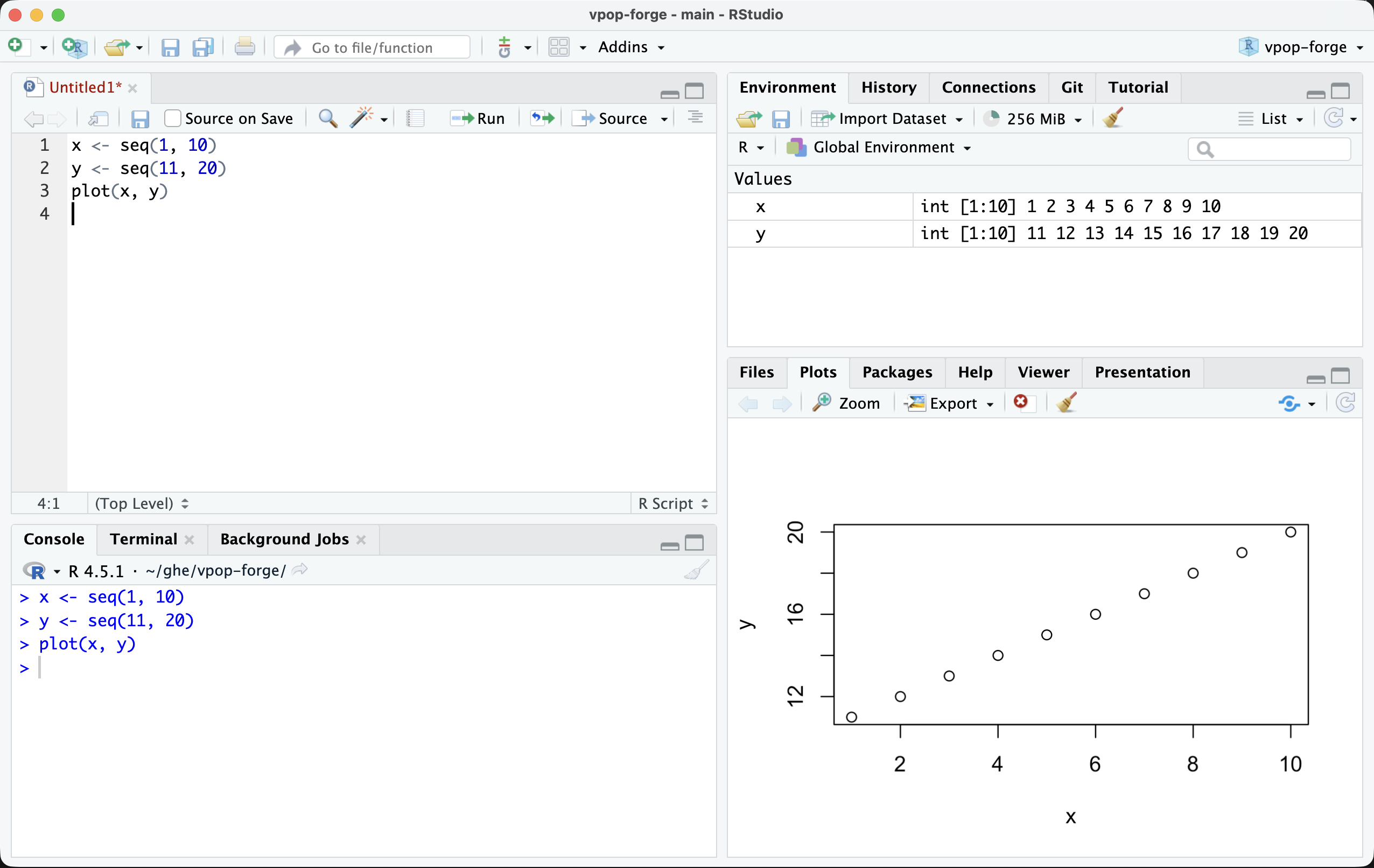
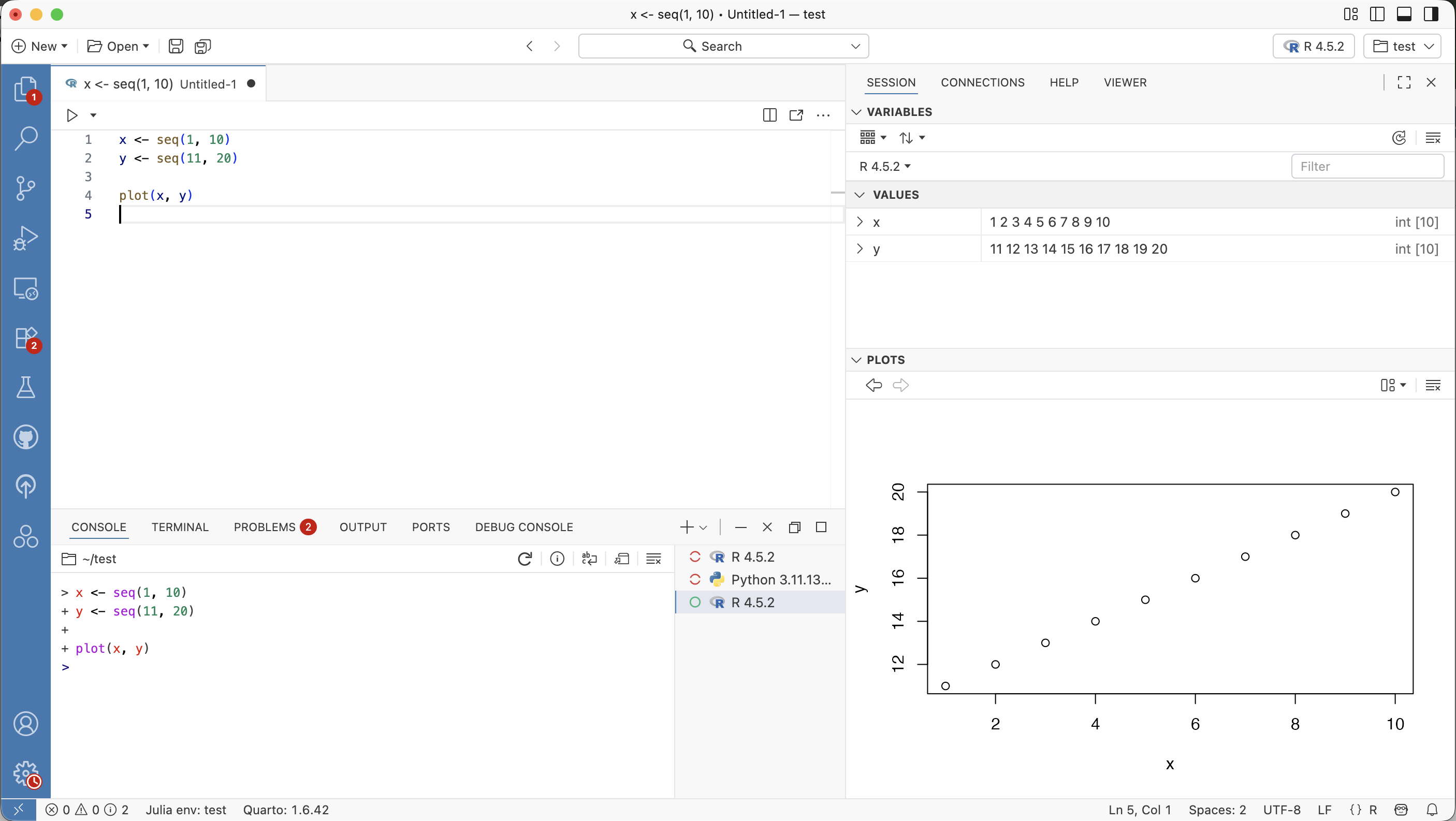
- Navigate the RStudio or Positron interface (Script/Source, Console, Environment, Plots/Viewer).
- Run code from a script (not just the Console) and explain why that matters.
- Use an RStudio/Positron Project (
.Rproj) to keep paths and files organized. - Adopt a “PMx mindset” for clean, auditable, reproducible work.
Key Ideas
R vs RStudio vs Positron (don’t mix them up)
- R is the programming language (it runs your code).
- RStudio is an IDE (a workspace that makes R easier to use).
- Positron is a modern IDE from Posit that also supports R workflows and projects.
If R is an engine, RStudio/Positron is the dashboard.
Why scripts matter in PMx
Typing commands in the Console is fine for quick checks.
But PMx work should live in scripts so you can:
- rerun analyses end-to-end
- share work with collaborators
- review changes (version control)
- avoid “it worked yesterday” problems
Your IDE Tour (5 minutes)
When you open RStudio or Positron, you usually see panes like these:
- Source (Script editor): where you write
.Rscripts or.qmdfiles - Console: where code executes
- Environment / History: what objects exist in memory
- Plots / Files / Packages / Help / Viewer: output and navigation
Note
If your layout looks different, that’s okay. The important part is knowing where code is written (Source) vs executed (Console).
Running Code the “Right” Way
Create a script (File → New File → R Script), then try this:
Run using:
- Cmd/Ctrl + Enter
You should see:
[1] 5Why not just type everything in the Console?
Because the Console is temporary. A script is repeatable.
The PMx Workflow Loop
In pharmacometrics, you will repeatedly:
- Load data
- Inspect + QC
- Wrangle
- Visualize
- Model
- Report/export
Projects (.Rproj)
An RStudio Project is a folder that contains a .Rproj file.
Both RStudio and Positron can open .Rproj files. When you open a project:
- The project folder becomes the working directory
- Files are organized in a consistent location
- Relative paths work reliably across machines
Note
Positron can also work directly with plain folders. However, using a .Rproj project keeps workflows consistent with RStudio and with most R-based PMx teams.
Tip
Use relative paths like:
read.csv("data/myfile.csv")Avoid absolute paths like /Users/yourname/Downloads/...
Your First Reproducibility Header
# Course: R for Pharmacometrics
# Lesson: R Basics 01
# Purpose: Getting oriented and setting up reproducible workflow
# Author: Your Name
# Date: 2026-02-21
Note
In R, the # symbol starts a comment.
Comments are ignored by R and are for humans reading the code.
Practice Problems
- Create a script and run
2 + 2from the script. - Create
id <- 101and print it. - Restart R. What happens?
- Create a Project for this course.
- Write one sentence explaining why scripts matter in PMx.
TipStep-by-Step Solutions
1–2. Run code from a script
2 + 2[1] 4id <- 101
id[1] 1013. Restart R
After restarting, objects in the Environment disappear. That’s expected—and it’s why scripts matter.
4. Create a Project
In RStudio:
- File → New Project → Existing Directory (or New Directory)
- Choose your course folder
- Open the
.Rprojfile to work in that project
5. One-sentence PMx reason
Example:
“Scripts make my analysis reproducible and auditable, which is essential in PMx work.”
Summary
- R is the engine.
- RStudio and Positron are workspaces.
- Scripts ensure reproducibility.
- Projects keep paths stable.
- PMx analysis follows a structured workflow loop.
TipQuick Tips
- If something “mysteriously breaks,” restart R and rerun the script top-to-bottom.
- Prefer projects + relative paths.
- Keep a clean folder structure from day 1.
- Save your work often, and use version control when you’re ready.